A repeatable workflow for creators who want watchable motion, consistent style, and fast iteration—without a heavy post-production stack.
SHERIDAN, WY, UNITED STATES, February 18, 2026 /EINPresswire.com/ — Short-form video rewards motion that reads instantly: the rhythm feels intentional, the subject stays coherent, and the style holds up from start to finish. Whether you’re making a dance-style clip (for trends, avatars, mascots, or character edits) or converting existing footage into an animation look, the same production reality applies: you rarely need one “perfect” generation—you need a workflow that reliably produces multiple usable takes.
This tutorial outlines a practical, tool-agnostic process you can run weekly: how to prep inputs, structure prompts like a director, evaluate outputs like an editor, and fix common failure modes (jitter, drifting identity, mushy limbs, style collapse). You can follow it with most modern video generation and stylization tools. Where helpful, the article includes optional example links so you can test the steps in a real interface.
1. What you’ll learn
How to define a “ground truth” spec before you generate anything
How to build a clean input pack (so motion and style stay stable)
A prompt framework for dance-style clips (movement + rhythm + camera)
A prompt framework for video-to-animation conversion (style + consistency)
A scoring rubric to quickly pick winners and avoid endless iteration
Troubleshooting patterns: what to change when results wobble or drift
A lightweight publishing finish checklist (so clips feel intentional)
Responsible-use and rights/permissions reminders for real-world workflows
2. Step 0: Set your target outcome (the “ground truth” spec)
Before prompts, write a simple specification that describes the clip you want in plain language. This keeps you from chasing novelty and helps you compare iterations fairly.
Use this template:
A) Clip goal (one sentence)
Example: “A punchy 6–8 second dance snippet that keeps the choreography clear and loops smoothly.”
B) Subject anchors (3–5 words each)
Example: “female creator, denim jacket, short black hair, warm studio lighting.”
C) Motion anchors (what must be true about movement)
Example: “Show the whole body, prioritize readable arms and feet, and avoid any limb glitches.”
D) Camera anchors (how it’s shot)
Example: “locked-off tripod, waist-to-full-body framing, no aggressive zoom.”
E) Style anchors (if stylized)
Example: “Sharp linework in an anime style, locked facial details, cohesive shading, light bloom.”
F) Constraints (what must not happen)
Example: “No facial changes, no costume swaps, no scene switches.”
This “ground truth” spec becomes your reference when judging outputs. If a clip violates a constraint, it’s not a winner even if it looks cool for one second.
3. Step 1: Build an input pack that reduces failure modes
Most quality problems are input problems in disguise. Your goal is not to feed the tool “more”—it’s to feed it “cleaner.”
For dance-style generation
Prefer full-body visibility: A subject that’s cropped at the knees invites unstable leg motion.
Simple background: Busy patterns can cause hallucinated motion or texture crawling.
Stable lighting: Avoid extreme flicker, strobing, or mixed color temperatures.
Clear silhouette: Contrast between subject and background improves limb definition.
For video-to-animation conversion
Pick a clip with consistent framing: Rapid cuts and shaky handheld footage often produce style drift.
Avoid heavy compression: Blocky artifacts can turn into “texture noise” after stylization.
Keep duration short: Start with 4–8 seconds; scale up only after you can hold consistency.
Lock the hero identity: If the face is small or blurred, many models will “invent” details.
If you want a quick quality checklist, use this table:
Input factor: Subject framing
Good: full-body / mid-full
Risky: cropped limbs
Why it matters: reduces limb ambiguity
Input factor: Camera
Good: locked / slow pan
Risky: shaky handheld
Why it matters: reduces jitter & drift
Input factor: Lighting
Good: steady
Risky: flickery / mixed
Why it matters: reduces texture crawling
Input factor: Background
Good: simple
Risky: busy patterns
Why it matters: reduces hallucinated motion
Input factor: Compression
Good: clean
Risky: heavy artifacts
Why it matters: improves stylization stability
4. Step 2: Choose a workflow: generate dance motion vs. convert footage to animation
These are different tasks with different “success signals.”
Dance-style generation = you’re judging rhythm, movement clarity, and performance vibe.
Video-to-animation conversion = you’re judging identity retention and style stability across frames.
You can do both in the same project, but if you’re learning the workflow, master them separately first.
5. Step 3: Direct the prompt like a choreographer (for dance-style clips)
A reliable dance prompt describes who, where, how it moves, how it’s shot, and how it feels.
The Director Prompt Framework (Dance)
1) Subject + wardrobe
“A complete body frame of a dancer rocking a bright hoodie and trainers…”
2) Setting + lighting
“In a simple studio space, diffused key light with a touch of rim illumination.”
3) Movement description
“Up-tempo dance moves, clear arm patterns, two-step footwork, and clean flow between beats…”
4) Rhythm + pacing
“On-beat movement, no sudden speed changes, loop-friendly ending…”
5) Camera language
“Camera stays locked on a tripod with full-body coverage; no handheld feel.”
6) Quality constraints
“No limb distortion, no face drift, no background morphing…”
If you want a quick way to keep prompts consistent, write them in the same order every time. That reduces accidental variation and makes results easier to compare.
Iteration tip: Generate 6 clips, not 1. Then evaluate. If you only generate one clip, you’re forced into emotional decisions (“it’s close enough”) instead of editorial decisions (“this take is objectively cleaner”).
Optional practice tool: If you want to test a dance workflow in a browser-based interface while you learn this process, you can try an online generator such as AI dance generetor online (use it purely as a sandbox for the steps above).
6. Step 4: Evaluate like an editor (a scoring rubric that saves hours)
You need a rubric to stop endless tinkering. Here’s a simple 100-point scoring method you can use for both workflows.
The 5-category scoring rubric
Category: Motion readability
Points: 0–25
What “good” looks like: movement is easy to follow; no jitter; limbs stay coherent
Category: Identity stability
Points: 0–20
What “good” looks like: subject remains recognizable; no face/body drift
Category: Style stability
Points: 0–20
What “good” looks like: look holds from start to finish; no mid-clip collapse
Category: Camera discipline
Points: 0–15
What “good” looks like: framing matches intent; no random zooms or snaps
Category: Publish readiness
Points: 0–20
What “good” looks like: minimal artifacts; trim-ready; loop or clean ending
Rule of thumb:
85+ = publishable with light finishing
70–84 = salvageable (trim, minor fixes, maybe regenerate one component)
<70 = restart with better inputs or simpler motion/camera
Write the score next to each clip. The act of scoring forces clarity and reduces “maybe it’s okay” bias.
7. Step 5: Troubleshoot dance clips (common failure modes and fixes)
Problem A: Jittery motion / micro-wobble
Likely causes: shaky camera instruction, complex background, too-fast movement, low subject clarity.
Fixes:
Enforce “locked-off tripod” and “stable framing” in the prompt
Simplify background and lighting
Reduce movement speed: “smooth, readable dance, no rapid foot shuffles”
Use shorter duration first (4–6 seconds)
Problem B: Limbs melt or hands look wrong
Likely causes: hands too small in frame, fast hand gestures, low contrast.
Fixes:
Increase subject size in frame (slightly closer full-body)
Specify “clear hand shape, no finger distortion”
Reduce gesture complexity: “simple arm swings, no intricate finger movements”
Problem C: Random outfit/background changes
Likely causes: weak constraints, conflicting style cues.
Fixes:
Add a constraint line: “wardrobe and background remain unchanged”
Remove overly creative style descriptors that may invite scene remixing
8. Step 6: Video-to-animation conversion (a stable, repeatable method)
When converting footage to an animation look, you’re balancing two competing goals:
Preserve timing and identity (the original video’s “truth”)
Apply style consistently (the animation look’s “rules”)
The Consistency-First Prompt Framework (Animation conversion)
1) Source intent
“Convert the existing video into an anime-style animation…”
2) Style definition
“Clean linework, consistent facial features, soft shading, mild bloom…”
3) Stability constraints
“Keep the same subject identity; no costume changes; no face drift…”
4) Camera preservation
“Preserve the original framing and camera movement…”
5) Texture discipline
“Avoid crawling textures; avoid flickering patterns…”
Conversion workflow (recommended order)
Run a short segment first (4–6 seconds)
Pick the most stable style take (even if it’s less dramatic)
Only then scale duration or add complexity
If drift appears, reduce variables (simpler style, simpler lighting, simpler background)
Optional practice tool: To test this workflow in a ready-made converter interface, try a sandbox tool to convert video to AI animation while following the steps above.
9. Step 7: Troubleshoot animation conversion (fix drift and “style collapse”)
Problem A: Face drift / identity changes mid-clip
Likely causes: small face in frame, motion blur, aggressive style, long duration.
Fixes:
Use a clip with a clearer face (or reduce motion blur)
Shorten duration and stitch later
Choose a less aggressive style (clean linework > painterly chaos)
Add explicit constraints: “identity-preserving, stable facial proportions”
Problem B: Flicker or texture crawling
Likely causes: noisy source, heavy compression, high-frequency background textures.
Fixes:
Start from a cleaner source file
Avoid busy patterns (brick walls, striped clothing)
Reduce stylization intensity; favor smoother shading
Problem C: The style looks strong in frame one—then falls apart
Likely causes: style too complex, clip too long, camera too dynamic.
Fixes:
Simplify style description (fewer adjectives)
Use shorter clips and edit together
Preserve camera movement rather than inventing new movement
10. Step 8: A quick finishing checklist (publish-ready in 10 minutes)
Even good generations benefit from a small amount of finishing. You don’t need a full post pipeline; you need a repeatable checklist.
Trim & pacing
Trim to the strongest 4–8 seconds
Remove awkward starts/stops
If it loops, make the last 10–15 frames resemble the opening
Audio and captions
Add captions early; readability matters
Keep SFX subtle; avoid loud spikes
If dance content: align visible movement with the beat you choose
Export discipline
Export for mobile first (most viewers)
Watch once on a phone screen before posting
Quality gate
If artifacts are visible at normal viewing distance, regenerate
If artifacts require pausing to notice, publish (don’t over-optimize)
11. Step 9: Use it responsibly—rights, permissions, and keeping audience trust
If you work with footage containing real people, recognizable likenesses, or third-party content, treat this like any other media production:
Ensure you have rights/permission to use the source footage
Avoid deceptive uses (misrepresentation, impersonation, or harmful edits)
For brand or public-facing work, add an internal review step
When appropriate, label stylized content so audiences aren’t misled
This is not just legal hygiene—it protects your channel’s trust and your brand’s consistency over time.
12. A “one-page” workflow you can reuse every week
If you want the entire method in a compact form, use this:
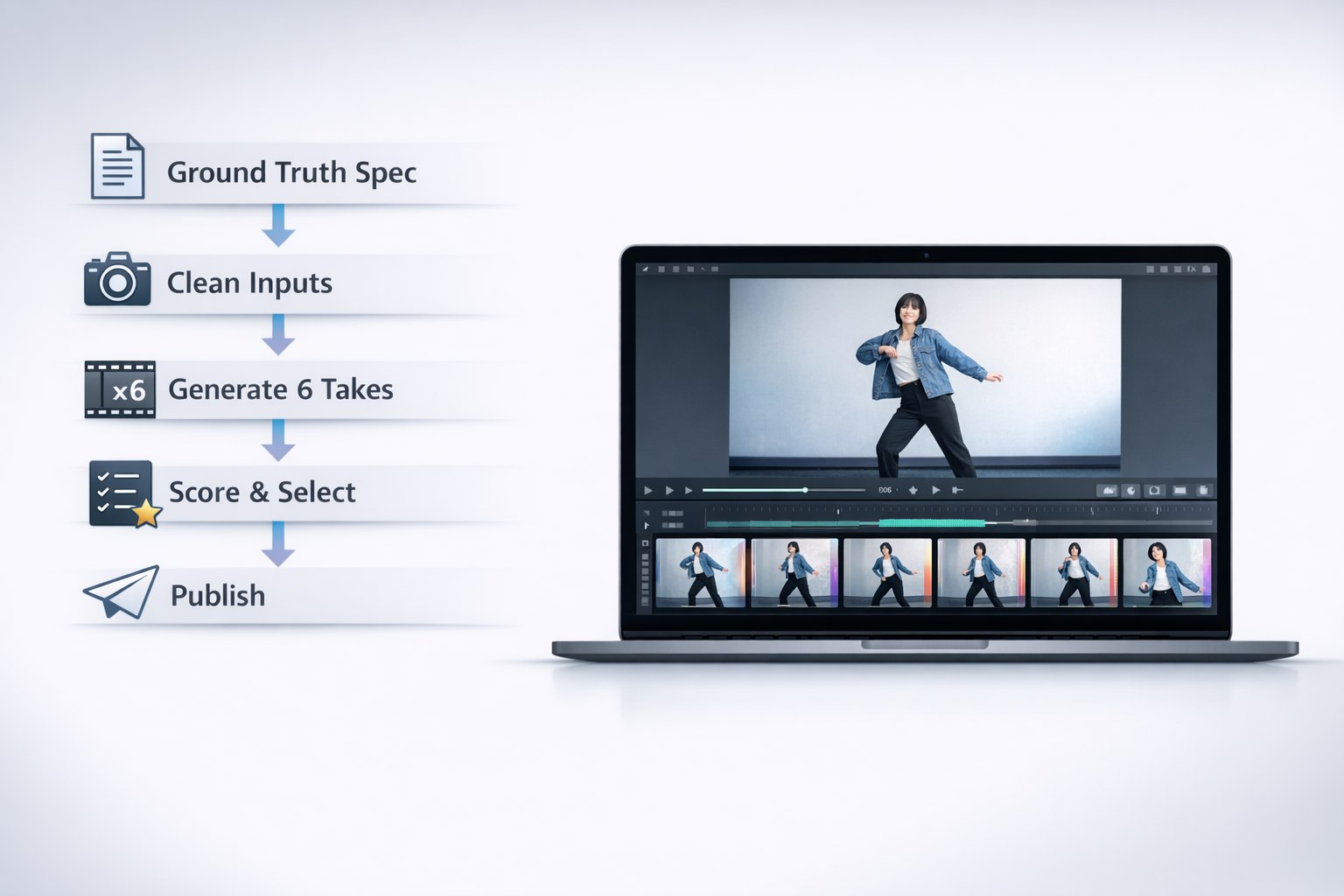
Write a ground-truth spec (goal, anchors, constraints)
Build a clean input pack (stable framing, clear subject, simple background)
Generate 6 takes (don’t gamble on 1)
Score each take (motion, identity, style, camera, publish readiness)
Troubleshoot with targeted changes (one variable at a time)
Finish lightly (trim, captions, audio discipline)
Publish and document what worked (so next week is faster)
The “documentation” part is what most people skip—and it’s what turns AI video from random outcomes into a dependable production asset.
13. Optional resources and practice links
If you’d like a place to practice these steps in a browser-based interface (without changing the tutorial approach), you can explore: GoEnhance AI. Use it as a sandbox to apply the workflow above—especially the input pack, 6-take iteration rule, and scoring rubric.
14. About this tutorial
This guide is written as a practical, tool-agnostic production workflow based on common failure patterns in short-form generation and stylization. Results vary by model, settings, and source footage quality. The core principle is stable across tools: reduce ambiguity in inputs, structure prompts consistently, iterate in batches, and evaluate with a rubric so you can ship results instead of chasing perfection.
Irwin
MewX LLC
+1 307-533-7137
email us here
Legal Disclaimer:
EIN Presswire provides this news content “as is” without warranty of any kind. We do not accept any responsibility or liability
for the accuracy, content, images, videos, licenses, completeness, legality, or reliability of the information contained in this
article. If you have any complaints or copyright issues related to this article, kindly contact the author above.